


Creating a professional presentation remains one of the most time-consuming tasks for entrepreneurs, students, and professionals. It doesn’t matter whether you use PowerPoint, Google Slides, or Keynote: structuring ideas, designing slides, choosing fonts, organizing content, and maintaining visual consistency can take hours. And often, the real problem isn’t design… it’s getting started.
In a world where time is a critical resource, a new category of tools has emerged: AI presentation tools capable of creating presentations automatically from simple notes or prompts. One of the fastest-growing platforms in this space is Gamma.app.
In this article, we analyze what Gamma is, how it works step by step, its real advantages and limitations, how it compares to PowerPoint, and whether it’s truly worth using as an alternative to traditional slide software.
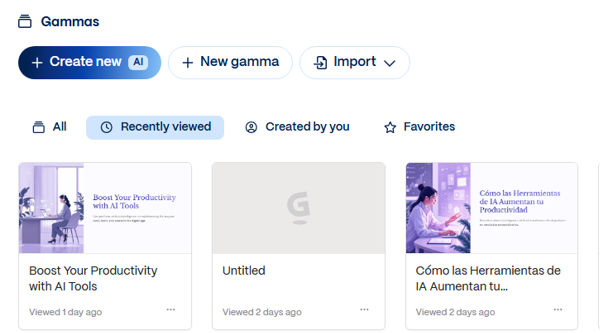
What Is Gamma.app?
Gamma is an artificial intelligence tool designed to automatically create presentations, documents, and visual pages. Unlike traditional slide tools, it doesn’t start with a blank slide — it starts with your idea.
You provide a topic, a prompt, or paste your notes, and the AI generates an organized structure complete with visual hierarchy, section titles, and properly distributed slide content.
Instead of thinking in individual slides, Gamma functions more like a structured visual storytelling generator. This makes it an attractive alternative to PowerPoint for users who want to create presentations automatically using AI.
How to Use Gamma Step by Step
1. Create an Account
Go to Gamma.app and sign up. It offers a free version with usage limits and paid plans for heavier use.
2. Choose What You Want to Create
You can select:
- Presentation
- Document
- Landing-style page
3. Write a Prompt or Paste Your Notes
This is where the AI does the heavy lifting. You can write something like:
"Create a presentation about digital marketing trends in 2026 for entrepreneurs."
Or simply paste an outline you already have prepared.
The clearer your input, the better the AI-generated presentation will be.
4. Select a Visual Style
Gamma allows you to choose themes, color palettes, and design styles before generating the final output.
5. Automatic Generation
Within seconds, the AI creates a structured presentation including:
- Cover slide
- Organized sections
- Clear bullet points
- Consistent design
- Balanced visual layout
This is where Gamma truly stands out as an AI tool for slides.
6. Manual Editing
You can edit text, rearrange content blocks, add images, and fine-tune the presentation according to your needs.
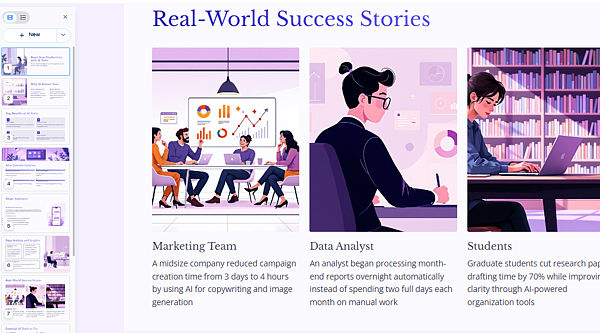
Real Use Cases
Entrepreneurs: Quickly create pitch decks to validate ideas or present to investors.
Students: Prepare academic presentations in less time.
Content creators: Turn scripts or blog posts into visual slide presentations.
Corporate teams: Generate internal reports, strategy decks, or business proposals efficiently.
Gamma is especially useful when the main obstacle is structuring the content from scratch.
Advantages of Gamma
1. Speed: Dramatically reduces presentation creation time.
2. Automatic structure: Organizes ideas logically and coherently.
3. Built-in design: No advanced design skills required.
4. Modern experience: Feels more fluid than traditional slide tools.
5. Ideal for fast drafts: Allows quick iteration without starting from zero.
Real Limitations
1. Limited creative control: It does not offer the same deep customization level as PowerPoint.
2. Prompt dependency: Vague instructions lead to generic results.
3. Not a replacement for advanced design: Highly complex or brand-sensitive presentations may require traditional tools.
4. Mindset shift: It changes how users think about slide creation.
Gamma vs PowerPoint: Brief Comparison
PowerPoint:
- Maximum design control
- Corporate standard tool
- Longer creation time
- Fully manual workflow
Gamma:
- AI-powered automatic generation
- Faster production
- Structure-first approach
- Less granular control
PowerPoint is ideal when absolute precision and customization are required. Gamma is ideal when speed and structured content generation are the priority.
Is Gamma Worth It?
It depends on your goals.
If you frequently create presentations and want to reduce the time spent building the initial structure, Gamma can become a strategic productivity tool.
If extreme customization or strict corporate formatting is your priority, traditional tools like PowerPoint will still be necessary.
In practical terms, Gamma works best as a creative accelerator rather than a complete replacement.
Frequently Asked Questions (FAQ)
Is Gamma free?
It offers a limited free plan and paid tiers with additional features.
Can it completely replace PowerPoint?
Not entirely. It is more efficient for quickly generating structured drafts.
Can presentations be exported?
Yes, Gamma allows sharing and exporting in different formats.
Is it suitable for professional presentations?
Yes, especially for fast drafts, proposals, and educational content.
Does Gamma use generative AI?
Yes, it uses generative AI to structure and organize content automatically.
Artificial intelligence tools that create presentations automatically are transforming how we work. Gamma doesn’t eliminate strategic thinking, but it significantly reduces the time between idea and execution.
For entrepreneurs, students, and creators who value speed and clarity, it can become a meaningful productivity advantage.
Here you can watch the Short where we show how this AI turns notes into full presentations in seconds:
{youtube}XfdJ7K07Q0M{/youtube}







 We turn your ideas into reality, creating unique digital experiences. With more than 15 years of knowledge and experience, we design and develop custom websites. We build brands and help them achieve success. We offer a complete service, from design and content creation to social media integration and administration.


